
Shopify Catalog: The AI Product Data Layer
Shopify Catalog is the unified, identity-resolved product-data layer that AI shopping agents read before they ever reach your store. Here's how the Universal Product Identifier works, how the Catalog differs from Merchant Center feeds and product schema, and a concrete checklist to make your products catalog-ready.
- What Is Shopify Catalog?
- Why Product Data Becomes the Bottleneck in AI Shopping
- How Shopify Catalog Works: The Universal Product Identifier
- Global Catalog, Storefront Catalog, and the Catalog API
- How Shopify Catalog Differs From Merchant Center and Product Schema
- How to Make Your Products Catalog-Ready: An Actionable Checklist
- A Reusable Prompt to Audit Your Product Data for the Catalog
- Measuring Catalog-Driven Traffic and What to Watch Next
What Is Shopify Catalog?
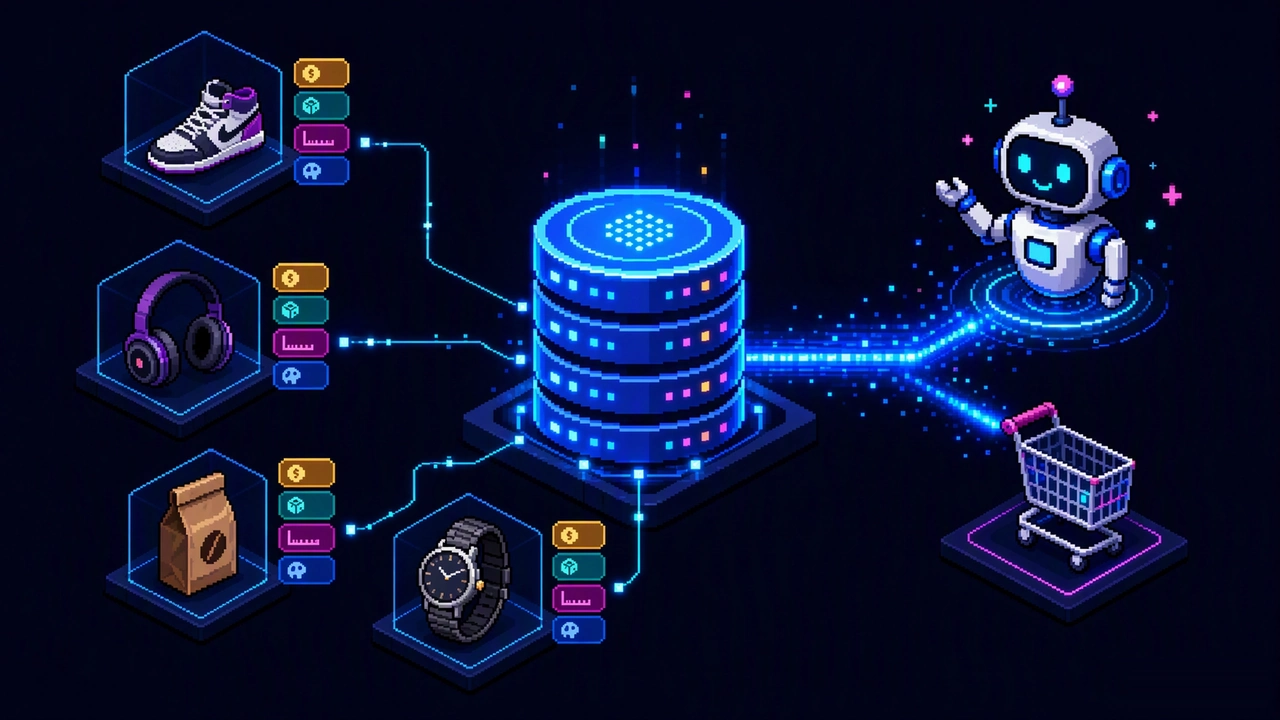
Shopify Catalog is the unified product-data layer that sits underneath every Shopify storefront and turns raw product records into a single, machine-readable index of what is for sale across the platform. In Shopify's own words, it is "a unified intelligence layer that standardizes product data across the platform", made available to developers and AI agents through the Catalog API. If a product page is what a human sees, the Catalog is what a machine reads.
That distinction matters because it is the difference between a store being browsable and a store being purchasable by software. Historically, the only way an external system could learn what you sold was to scrape your HTML, parse your Google Shopping feed, or integrate with your admin one app at a time. Shopify Catalog collapses all of that into one canonical, structured source of truth: every product, variant, price, availability, image, and attribute from millions of merchants, normalized into a consistent schema and addressable by a stable identifier.
For merchants, the Catalog is mostly invisible — it is populated automatically from the products you already maintain in Shopify Admin. For developers and, increasingly, for AI shopping agents, it is the front door. When ChatGPT, Google's AI surfaces, Microsoft Copilot, or an in-assistant checkout decides which product to recommend and buy, it is reasoning over structured catalog data, not over your theme's markup. This guide explains how the Catalog works under the hood, how it differs from the feeds you already know, and — most practically — how to make sure your products are represented in it accurately.
If you have not yet read our Shopify Agentic Commerce guide, start there for the merchant-level picture of how AI agents discover and buy. This article zoom in one layer deeper, onto the data infrastructure that makes agentic shopping possible.
Why Product Data Becomes the Bottleneck in AI Shopping
AI shopping changes where the sale is decided. On Google, a shopper sees ten blue links, clicks a few, and lands on your site — your conversion rate is mostly your problem from there. In an AI conversation, a large language model has already narrowed the field to one or two products before the shopper ever reaches your store. The model can only recommend what it can accurately read, and it reads structured catalog data far better than it reads scraped pages.
Shopify's own Q2 2026 research makes the stakes concrete. According to Shopify's data, AI-referred sessions to Shopify storefronts grew roughly 197% year over year, and when those AI-referred shoppers reached a product page they converted about 80% better than organic search visitors — with around half of AI sessions landing directly on a product page rather than a homepage or category. The intent is higher and the journey is shorter, which means the product that wins the recommendation wins the order.
The single most important number for this guide: Shopify reports that when AI search used structured Shopify Catalog data to find and recommend products, the shoppers it referred converted at roughly twice the rate of those arriving from scraped or third-party product feeds. Clean, structured catalog data is not a hygiene task — it is a direct lever on revenue in the AI channel. The corollary is equally important, and Shopify states it plainly: the product data that makes your catalog legible to AI is the same data that helps those products get found in organic search. One enrichment effort feeds both channels.
This is the strategic bet behind Shopify's push into agentic distribution — the same bet we covered in our Universal Commerce Protocol (UCP) guide. UCP is the language agents use to transact; the Catalog is the data they use to decide what to transact on. You cannot win the AI channel with checkout plumbing alone if your product data is a mess.
How Shopify Catalog Works: The Universal Product Identifier
The hardest problem in a catalog of billions of listings is not storage — it is identity. The same pair of sneakers is listed by a hundred merchants under a hundred different titles, with inconsistent brands, sizes, colors, and misspelled attributes. To recommend "the same product" reliably, the platform needs a way to say "these listings are one thing." That is what the Universal Product Identifier (UPI) does.
Shopify builds the UPI through clustering: it groups listings that describe the same product and assigns them a shared identity. As documented in Shopify Engineering's write-up, the process is deliberately precision-first and happens in widening scopes — first clustering within a single store, then across stores, and finally unifying identical products across merchants under a single global UPI. A shop-scoped identifier is formatted roughly as shop_id:brand:model, which then resolves into the global identity.
The clustering logic rests on one deceptively simple question: "What is the buyer primarily purchasing this product for?" If an attribute does not change the answer to that question, it is a variant, not a distinct product. A red mug and a blue mug are the same purchase; a mug and a tumbler are not. Getting this boundary right is what lets an agent compare like-for-like prices and availability instead of hallucinating that two different things are interchangeable.
Under the hood, the pipeline is a hybrid of vector search and large-language-model reasoning:
- Embeddings + nearest-neighbor search. Each product is embedded as a vector and indexed with HNSW; the system connects to the 100 closest neighbors by cosine similarity and stops expanding at a distance threshold (around 0.25) so it does not over-merge genuinely different items.
- Two-stage LLM review. A first model stage proposes candidate groupings; a second stage critiques them — "Stage 1 proposes; Stage 2 reviews" — with a default bias to keep items together unless there is clear evidence they differ.
- Structured output. The models are constrained with structured output so they return valid, typed JSON rather than free text; Shopify reports free-form parsing errors on the order of a fraction of a percent, and notes that simply cleaning non-ASCII characters from titles improved recall by about 8%.
The practical lesson for merchants is buried in those engineering details: the cleaner and more consistently formatted your titles, brands, and option names are, the more accurately the clustering resolves your products into the right UPI — and the more reliably agents can find and compare them.
Illustrative identity resolution

Listing A:  "Nike Air Max 90 Sneaker - White/Black, US 10"
Listing B:  "NIKE AIRMAX90 WHT/BLK SZ 10"
Listing C:  "Adidas Ultraboost - Black, US 10"

  -> A and B resolve to the SAME global UPI (same product, noisy titles)
  -> C stays a DIFFERENT UPI (different brand/model)

Shop-scoped id:  shop_id:brand:model   ->   global UPI
Global Catalog, Storefront Catalog, and the Catalog API
"Shopify Catalog" refers to a few related surfaces, and conflating them causes real confusion. The two scopes you need to know are the Global Catalog and the Storefront Catalog, both reachable through the Catalog API.
| Surface | Scope | Typical use |
|---|---|---|
| Global Catalog | Searches across all Shopify merchants — hundreds of millions of listings | AI agents and apps that need to find the best product for a request regardless of which store sells it; cross-store price and availability comparison |
| Storefront Catalog | Scoped to a single store's products | A store's own search, recommendations, merchandising, and agent-driven checkout within that brand |
| Catalog API | The programmatic interface to both | Developers and agents querying structured product data; now supports image and multimodal search, and is accessible with an API key |
For developers, the important shift in 2026 is that this stopped being gated. Agentic commerce became self-serve for every developer, and the Catalog API is open with just an API key, exposed both as a REST-style interface and through the Model Context Protocol (MCP) so an agent can call product search directly. Multimodal search — querying by image, not just text — means an agent that a shopper showed a photo to can now match it against structured listings. See our overview of what Shopify AI can do for where these APIs surface in the admin.
For merchants, the mental model is simple: you do not "submit" to the Global Catalog the way you submit a feed. Your products are already in it, derived from your admin data. Your job is data quality, not enrollment.
How Shopify Catalog Differs From Merchant Center and Product Schema
Most Shopify merchants already maintain at least one product data surface — a Google Merchant Center feed and JSON-LD product markup on their theme. It is tempting to assume the Catalog is "just another feed." It is not, and the difference is about who consumes it and how authoritative it is.
| Data surface | Primary consumer | Source of truth | What it enables |
|---|---|---|---|
| Google Merchant Center feed | Google Shopping / ads | A periodically exported feed you configure | Shopping listings and ad placements on Google |
| Product JSON-LD (schema.org) | Google, other crawlers | Markup rendered in your theme | Rich results and eligibility in AI Overviews |
| Shopify Catalog / Catalog API | AI agents and apps (ChatGPT, Copilot, Gemini, Shop, your own apps) | Live, structured, platform-wide, identity-resolved | Agentic discovery, comparison, and checkout across stores |
The overlap is intentional and useful: the structured attributes that populate your Catalog are largely the same attributes that make a Merchant Center feed and JSON-LD block accurate. That is why our Shopify SEO in the Google AI Search era guide treats feed, schema, and catalog as one data-quality discipline rather than three separate chores. The 2026 shift is that Google's Merchant Center and feed requirements increasingly point back to structured, API-readable data — a trend we tracked in our coverage of Google's Content API shutdown and Merchant API migration.
How to Make Your Products Catalog-Ready: An Actionable Checklist
Because the Catalog is derived from the data you already maintain, "optimizing for Shopify Catalog" is really "cleaning up your product data" — work that pays off in AI, organic search, and paid channels at once. Here is a concrete, prioritized checklist. Treat it as a one-time remediation followed by an ongoing publishing standard.
- Standardize titles. Use
Brand + Model/Product + Key differentiatorand stop stuffing. Consistent, well-spelled titles are the single biggest driver of correct UPI clustering — remember that even cleaning stray characters measurably improved recall. - Fill in
brandand GTIN/MPN/SKU. Brand and global identifiers are exactly what the clustering logic keys on to unify the same product across listings. Leaving brand blank or inventing inconsistent values fragments your identity. - Model variants correctly. If an option does not change what the buyer is purchasing it for, it is a variant (size, color), not a separate product. If it does change the answer, it should be its own product. This mirrors the platform's own clustering rule.
- Complete structured attributes, not just descriptions. Material, dimensions, fit, capacity, compatible devices — these are the fields agents compare when a shopper asks for "the best running shoe under $120 in a wide." Prose cannot be filtered; attributes can.
- Keep price and availability accurate and current. Agents will not reliably recommend a product they cannot confirm is in stock at a real price. Stale inventory is a silent reason you lose AI recommendations.
- Use clean, high-quality images on white or consistent backgrounds. With multimodal Catalog search now live, images are queryable inputs, not just decoration. Alt text and consistent framing help.
- Write for extraction, not just for humans. Front-load the facts an agent needs to answer a question in the first sentence of each description. Our AI product description prompts and checklist gives copy-paste prompt templates for exactly this.
- Verify how you actually appear. Ask a few AI shopping assistants to find one of your products and screenshot what they show. That is the shopper's real Catalog view — fix the data where it is wrong.
If you are starting from scratch, fold these standards into the rollout plan in our 90-day Shopify AI launch plan rather than treating them as a backlog item. New products should ship catalog-clean from day one.
A Reusable Prompt to Audit Your Product Data for the Catalog
You do not need a data team to run a first pass. A capable LLM can act as a catalog-quality auditor if you give it a product record and a precise rubric. Paste your product's title, description, options, and attributes into a model and use a prompt like this:
You are a product-data auditor for AI shopping.
Given a product record, output JSON with these fields:
  title_quality      (does it follow Brand + Model + differentiator?)
  brand_present      (true/false)
  missing_attributes (list of decision-relevant attributes not captured)
  variant_errors     (options that should be variants, or vice versa)
  price_stock_clear  (is current price and availability unambiguous?)
  agent_answer_risk  (what question could an agent NOT answer from this data?)
For each issue, give a one-line fix.
Do not invent attributes that are not in the source data.

PRODUCT RECORD:
"""[paste title, body_html, options, metafields here]"""
The last instruction — do not invent attributes — is the guardrail that matters most. The same hallucination risk we cover in our AI hallucination prevention guide applies here: an auditor that fills gaps with plausible-sounding specs will make your data look complete while quietly corrupting it. Run the audit, then verify every suggested fix against your real product before you apply it in the admin.
Measuring Catalog-Driven Traffic and What to Watch Next
Because the Catalog feeds AI channels you do not control, attribution is genuinely harder than measuring a Google Ads campaign. Start with what Shopify surfaces natively: AI-referred sessions and orders in your analytics, and the growing share of sessions that land directly on product pages. The headline signals to track are the ratio of AI-referred to organic conversion, and whether your high-margin, spec-led categories are the ones being recommended — those are exactly where the roughly 2x structured-data conversion advantage shows up.
Two developments are worth watching because they change how much the Catalog is worth to you. First, agentic commerce traffic is compounding fast — our coverage of Shopify's reported 8x growth in agentic commerce traffic shows how quickly this channel is moving from experiment to must-win. Second, the demand side is consolidating around structured feeds: our report on ChatGPT Ads requiring product feeds for shopping results signals that clean catalog data is becoming table stakes to appear at all, not just to appear well.
The through-line is that product data has moved from the bottom of the SEO checklist to the center of commerce strategy. Merchants who treat the Catalog as a first-class asset — the same asset that powers their feeds and their schema — will compound an advantage across every AI surface at once.
FAQ
Do I have to submit my products to Shopify Catalog?
No. Shopify Catalog is populated automatically from the product data you already maintain in Shopify Admin. There is no feed to upload for the Catalog itself — your job is data quality (accurate titles, brands, attributes, variants, price, and availability), not enrollment.
Is Shopify Catalog the same as my Google Merchant Center feed?
No. A Merchant Center feed is a periodically exported file optimized for Google Shopping, while Shopify Catalog is a live, platform-wide, identity-resolved data layer consumed by AI agents and apps through the Catalog API. They overlap because both reward clean structured data, but they serve different consumers.
What is a Universal Product Identifier (UPI)?
A UPI is a stable identifier that represents the same product across many listings. Shopify clusters listings that describe the same product — first within a store, then across stores — using embeddings plus a two-stage LLM review, and resolves them to a shared identity so agents can compare like-for-like products accurately.
Can AI agents search my products by image?
Yes. The Catalog API supports image and multimodal search, so an agent can match a photo a shopper provided against structured listings, not only text queries. Clean, consistent product images improve those matches.
Will cleaning up my product data help SEO as well as AI shopping?
Yes. Shopify's own guidance is that the product data making your catalog legible to AI is the same data that helps products get found in organic search. Attribute and title hygiene pay off across AI, organic, and paid channels simultaneously.
Start a free trial and apply this guide step by step.